


How to Change Server and Region in Dota 2 (and What It Does to Queue Times)

Changing your server in Dota 2 takes under 30 seconds from the main menu. What happens after you flip that setting is a different story — your queue time could go from 90 seconds to 12 minutes, your ping could triple, or nothing changes at all. It depends almost entirely on which region you switch to and when you play.
This guide covers the exact steps to change your Dota 2 server, a full breakdown of every available region, what each switch does to your queue times and matchmaking pool, how ping thresholds affect your gameplay, and the one thing changing servers definitely does NOT do — affect your MMR.
Contents
Why Players Change Servers in Dota 2
Before getting into the mechanics, it helps to understand the legitimate reasons behind a server switch. Most players change regions for one of four reasons.
Travel. If you normally queue EU West but you fly to Southeast Asia for two weeks, keeping EU West selected means every game runs at 180-250 ms ping. Switching to SEA during your trip makes every game playable. When you land home, you switch back.
Regional server issues. High packet loss spikes, Game Coordinator disconnects, or routing problems can make your home server unplayable for hours. Switching to a secondary region with stable connectivity is a faster fix than waiting for Valve to patch infrastructure. Our Game Coordinator error guide covers the full diagnostic, but sometimes a region swap is the fastest solution.
Playing with friends in another region. If your North American friend and your European account want to queue together, one of you has to concede on ping. Dota 2 allows multi-region queuing, but the lobby always forms on the server where both players meet — which can mean unusual latency for one party.
Exploring a different matchmaking environment. Some players switch regions specifically to experience different playstyles or meta tendencies. EU East, Russia, SEA, and South America all have distinct hero preferences and communication cultures that are visible even at similar MMR brackets. This is a legitimate exploration reason, not an MMR manipulation one — we cover the MMR question thoroughly below.
How to Change Your Server Region in Dota 2 (Step by Step)
The Dota 2 client interface has changed several times over the years, so here is the exact path as of patch 7.41f — the current version at time of writing.
Step 1: Open the Dota 2 Client Main Menu
Launch Dota 2 and wait for the main menu to fully load. Make sure you are not in a party or in a queue, since region settings cannot be changed while matching is active. If you are in a party, the party leader controls the region setting for the group.
Step 2: Open Settings
Click the gear icon in the top-left corner of the screen (next to the Dota 2 logo), or press F10 on your keyboard. This opens the full settings panel with tabs for Video, Audio, Controls, Interface, and more.
Step 3: Navigate to the “Gameplay” or Settings Main Page
Look for the section labeled “Primary Matchmaking Region.” On some client versions, this appears directly on the first page of Settings under a “Network” or “Gameplay” header. On others, scroll down to find it near the bottom of the main settings list. It is not hidden in a submenu — it is one of the top-level settings on the main settings page.
Step 4: Select Your Region
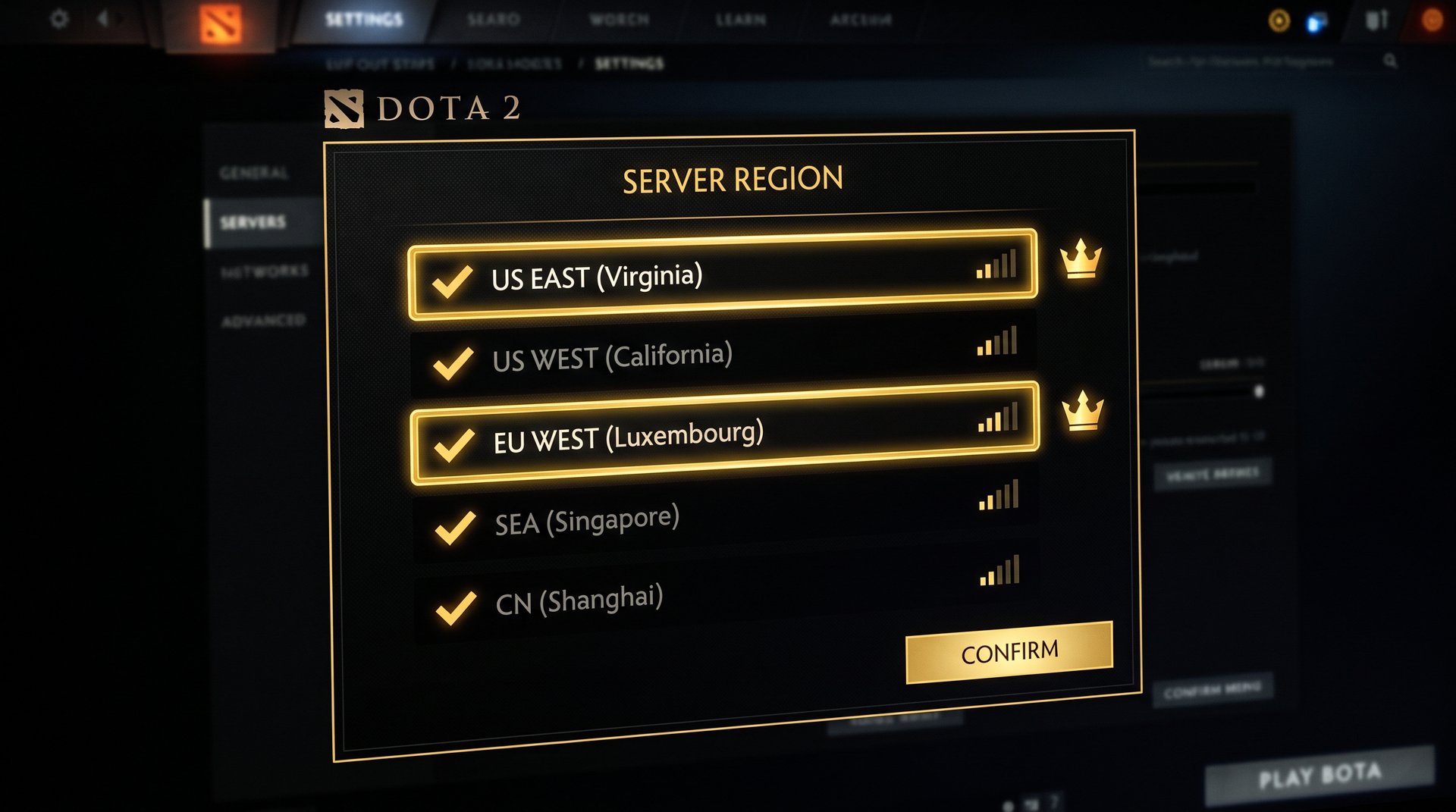
Click the dropdown next to “Primary Matchmaking Region” and choose the server you want. The dropdown lists all available regions. Your selection takes effect on the next queue you enter — you do not need to restart the client.
Step 5: Enable Additional Regions (Optional)
Below the primary region selector, you will see checkboxes for “Additional Matchmaking Regions.” Enabling these allows Dota 2 to consider you for lobbies on those servers as well, which can reduce queue time at the cost of some latency unpredictability. If you enable EU West and EU East simultaneously, you may get placed on either one — the client tells you which server a found game is on before you accept.
Step 6: Queue as Normal
Close settings and enter the matchmaking queue. The region shows in the queue status bar. If you selected multiple regions, the bar may show all active regions until a game is found on one of them.
That is the full process. No client restart, no cooldown, no verification. The setting applies immediately and persists until you change it again.
All Dota 2 Server Regions: Full List
As of 2026, Dota 2 offers matchmaking across 14 regions. Here is every available server with its general characteristics.
| Region | Server Code | Player Population | Best Used From |
|---|---|---|---|
| Europe West | EU W | Very High | Western Europe, North Africa |
| Europe East | EU E | High | Eastern Europe, Turkey, Middle East |
| Russia | RU | High | Russia, Central Asia, Belarus, Ukraine |
| SE Asia | SEA | Very High | Southeast Asia, Taiwan, Korea, Japan nearby |
| US East | USE | Medium | Eastern US, Canada East, Brazil North |
| US West | USW | Low-Medium | Western US, Canada West |
| South America | SA | Medium | Brazil, Argentina, Colombia, Chile (central) |
| Australia | AU | Low | Australia, New Zealand |
| Dubai | UAE | Low-Medium | Middle East, Persian Gulf, South Asia |
| India | IN | Low-Medium | India, Sri Lanka, Bangladesh |
| Japan | JP | Low | Japan, Korea |
| Chile | CL | Low-Medium | Southern South America |
| Peru | PE | Low | Peru, Ecuador, Bolivia |
| South Africa | ZA | Low | Southern and Eastern Africa |
How Changing Servers Affects Your Queue Times
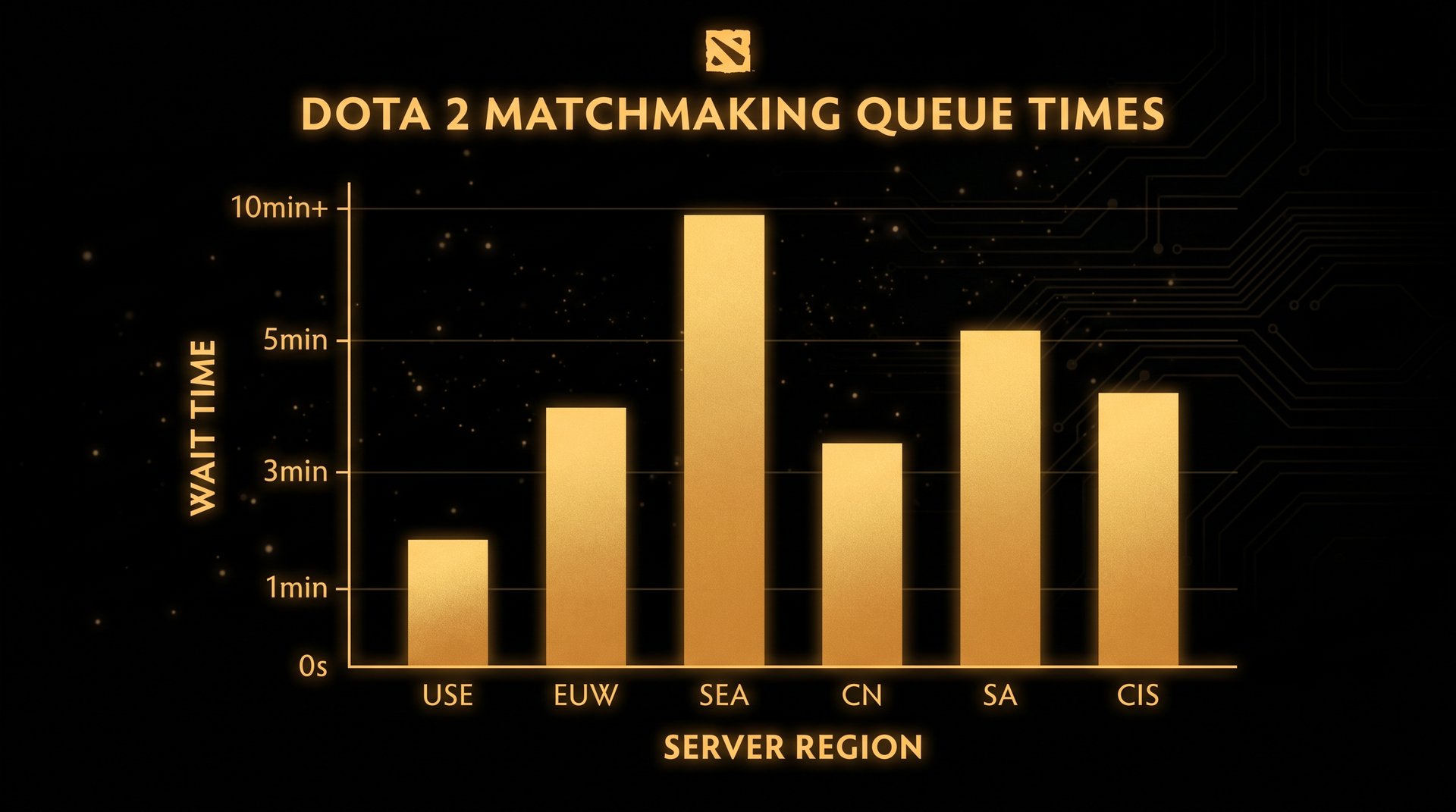
Queue time is the most directly felt consequence of a server switch. Understanding why queue times differ by region helps you make a smarter decision about which secondary regions to enable — and which ones to avoid during off-peak hours.
The Population Equation
Dota 2 matchmaking works by finding the best possible 10-player game from the pool of people currently searching. The larger that pool, the faster a suitable 10 are found. EU West and SEA both run several hundred thousand players during peak hours, which is why games find in 60-90 seconds. Australia, by comparison, has a fraction of that active population. The algorithm cannot conjure players that are not there — it has to either wait longer or relax the match quality constraints (MMR spread, behavior score spread, lane role matching). Most players do not want that trade.
Peak Hours vs. Off-Hours
The difference between peak and off-peak can be dramatic on smaller servers. A region like Dubai might queue in 3-5 minutes during its evening peak (18:00-23:00 local) and take 12-15 minutes at 03:00 local time. SEA barely notices the difference because the region spans so many time zones that peak hours overlap across countries. Before committing to a non-home server, check whether your play time aligns with that server’s peak window. If you play from 14:00-18:00 Central European Time and want to try India servers, you are playing at off-peak India evening time — queues will be long.
Queue Time by Region: What to Expect
These figures represent community-reported general ranges and are not Valve-published data. Actual times depend on your MMR bracket, role queue, and time of day.
| Region | Peak Queue (est.) | Off-Peak Queue (est.) | Population Tier |
|---|---|---|---|
| EU West | 1-2 min | 3-5 min | Very High |
| SE Asia | 1-3 min | 3-6 min | Very High |
| Russia | 1-3 min | 4-7 min | High |
| EU East | 2-4 min | 5-8 min | High |
| US East | 2-4 min | 5-9 min | Medium |
| South America | 2-5 min | 6-10 min | Medium |
| US West | 3-6 min | 6-12 min | Low-Medium |
| Dubai | 3-6 min | 7-15 min | Low-Medium |
| India | 3-7 min | 8-18 min | Low-Medium |
| Australia | 4-8 min | 10-20 min | Low |
| Chile / Peru | 4-9 min | 10-25 min | Low |
| Japan | 5-10 min | 12-30+ min | Low |
| South Africa | 6-12 min | 15-40+ min | Low |
The “+” entries are not exaggerated. On South Africa or Japan servers during off-peak hours, wait times can extend well past 30 minutes at non-Archon MMR brackets where the player base is already thin. Multi-region queuing helps here — enabling a second well-populated region as a fallback usually cuts the worst-case wait significantly.
Role Queue Impact
Role queue (Ranked Roles) adds an extra matchmaking variable on top of region. If you are queuing as a Hard Support on a low-population server at 03:00 local, the system may not be able to find five people with compatible role selections for a very long time. Unranked or Turbo mode skips role-based constraints and almost always finds faster games on small servers — worth knowing if you are testing a new region before committing to ranked play there.
Ping and Latency — What to Expect on a Different Server
Queue time is an inconvenience. Ping is a gameplay problem. The two are related but distinct — you can queue on SEA and get a 90-second game, but if you are in London that game runs at 160 ms and your spells are sluggish to confirm.
Why Physical Distance Matters
Dota 2 traffic travels at roughly the speed of light through fiber, but “roughly the speed of light” still means 10-20 ms per 3,000 km plus routing overhead and server processing delay. London to Singapore is about 10,700 km as the crow flies. Add routing hops and you are looking at 160-200 ms baseline. That is not a number you can engineer around with settings — it is physics.
Within Europe (EU West to EU East), the physical difference is small enough that many players keep both enabled without noticing a meaningful ping difference. The same is true of US East to US West for players on the coasts. The big jumps are intercontinental: EU to SEA, US to Australia, anything to South Africa.
The Ping Thresholds That Matter in Dota 2
| Ping Range | Gameplay Feel | Competitive Viability |
|---|---|---|
| Under 50 ms | Instant — no perceptible delay | Full |
| 50-100 ms | Very slight delay on immediate actions | Full |
| 100-150 ms | Noticeable input lag — spells cast slightly late | Viable for most roles |
| 150-200 ms | Meaningful lag — reaction-based skills become unreliable | Difficult for cores; ok for pos 5 |
| 200-250 ms | Significant lag — mechanical heroes feel clunky | Very difficult |
| Above 250 ms | Severe input delay — spells may miss intended windows | Not recommended for ranked |
Players on high-ping servers often gravitate toward heroes with point-and-click or proximity abilities rather than skillshots and combo timing. Pudge, Tide Hunter, and Dragon Knight play much more comfortably at 180 ms than Storm Spirit or Invoker do. If you are planning extended play on a distant server, hero selection matters.
If you use a Dota 2 boosting service or coaching session, your coach or booster will by default queue on your account’s home server. If they are connecting from a different country, they manage the latency themselves — you do not need to change your region settings for service sessions.
Multi-Region Queuing and Mixed-Ping Lobbies
When you enable multiple regions, the lobby that forms may include players from different servers. Dota 2 selects one server for the game — whichever region found the match — and all players connect to it. This means if you queue EU West + EU East from Germany, you might find a game on EU East and a Russian player queuing the same two regions joins too. Both of you have playable ping to EU East. The system generally handles this well within neighboring regions. Cross-continental multi-region queuing (EU West + SEA simultaneously) usually produces a game on whichever server found it first — and one party will have high ping. It is almost always better to pick one primary region when the servers are geographically distant.
Does Changing Your Server Affect Your MMR?
No. Changing your server region does not affect your MMR in any way. Your MMR is tied to your Steam account, not to any regional leaderboard. It moves up or down based on wins and losses regardless of which server hosts the game.
Dota 2 used to have separate regional MMR calibrations in earlier versions of the ranked system, but the current system (as of several major patches ago) uses a single unified MMR value. Whether you win a game on EU West or SEA, the gain or loss is applied to the same number.
The detailed breakdown of what does and does not change when you switch regions — including Smurf Detection, behavior score, and the old regional leaderboard history — is covered in our companion post: Does Switching Servers Change Your MMR? Region-Hopping Rules.
One thing that does change is the leaderboard your MMR is compared against. If you are Immortal rank and switch to a different server, you fall off that region’s local leaderboard and appear on the new one at a position based on your existing MMR. You do not “reset” — you just relocate. For most players below Immortal, this distinction is irrelevant since local leaderboard visibility only kicks in at the very top of the rank distribution.
When Does Changing Servers Actually Make Sense?
Knowing how to change your server is one thing. Knowing when it is worth the trade-off is where the real decision lives.
You Are Traveling
This is the clearest case. If your home internet routes you to a server 150 ms away for two weeks, switch. The queue time overhead on a well-populated destination server (SEA, EU West, Russia) is minimal compared to the gameplay benefit of playing at 30 ms instead of 180 ms. Switch back when you land home.
Your Region Has Routing Problems
Regional ISP routing issues, Valve CDN problems, or datacenter maintenance can cause your home server to spike unpredictably. If you are dropping to 300 ms randomly mid-game on a server that normally runs at 30 ms, switching to a secondary region while the issue resolves is smarter than rage-queuing through broken infrastructure. Check online Dota 2 status trackers before assuming the problem is region-wide versus local to your ISP.
Playing With International Friends
If a friend in Southeast Asia and you (in Europe) want to play together, someone has to take the ping hit. The practical approach: check whose connection handles higher latency better. If your friend has 80 ms to EU East and you have 160 ms to SEA, play EU East. Use the ping table above to estimate what each of you is walking into, pick the server where the combined gameplay quality is highest, and let the player with better latency tolerance play the more mechanically demanding role.
Exploring Different Metas
Different regions have genuinely different draft tendencies and playstyles at the same MMR level. If you have been stuck in the same bracket for months and want to learn from a different playstyle environment, a region experiment is a legitimate approach. Queue on SEA or EU East for a week, pay attention to draft patterns, and bring what you learn back to your home server. Just be realistic about queue times and ping before committing.
When It Does NOT Make Sense
Switching servers to find “easier” lobbies is a common misconception — we addressed this above. Your MMR calibrates you to the same relative difficulty on every server. Switching also does not help if your issue is behavior score, hero pool problems, or concerns about your account health — those follow the account, not the region. If you are trying to genuinely improve your rank through skill development, our MMR improvement guide is a more relevant resource than server hopping.
Tips for Playing Well on a Non-Home Server
If you are committing to an extended session on a non-home server — not just one game but regular play — these adjustments improve your experience significantly.
Pick Ping-Tolerant Heroes
Save your Invoker, Storm Spirit, and Meepo games for your home server. On a 150+ ms connection, prioritize heroes with short combo sequences, durable kits, or proximity-based abilities. Tankier position 3 heroes, straightforward carries like Wraith King or Sven, and support heroes with wide-radius or point-and-click disables all work better under lag. The mechanical ceiling of those heroes is lower, which means ping is less of a limiter.
Adjust Your Autoattack Timing Expectations
Attack animation canceling — the bread and butter of efficient last-hitting — is harder at high ping because the action-to-visual-feedback loop is longer. If you normally rely on tight animation cancels for last hits on your carry, you will notice them drifting. Compensate by issuing attack commands slightly earlier than you normally would. It takes a few games to recalibrate, but the adjustment is doable for most players.
Language and Communication
Different servers default to different languages in chat. SEA lobbies might include Vietnamese, Thai, Tagalog, and English simultaneously. Russia lobbies are heavily Russian. South America runs mostly Portuguese and Spanish. If you are playing on a server with a language you do not speak, visual pings and minimap communication become more important than chat. Learn a few draft-phase ping sequences and lean on the VGS system more than you normally would.
Remember to Switch Back
This sounds trivial, but it is the most common complaint: “I woke up and had terrible games because I forgot I switched to Australia last night.” Make a habit of checking your region setting when you sit down for a session, especially after travel. The setting persists until you change it — there is no automatic revert to a home region.
For players who use professional Dota 2 coaching, let your coach know which server you are queuing on before sessions. Some coaching setups are optimized for specific regions, and your coach may recommend adjusting your region for the session to optimize their and your combined connection quality.
Common Mistakes When Changing Servers
A few patterns come up repeatedly when players change regions for the first time.
Forgetting multi-region is enabled. If you enable EU West + EU East + Russia as additional regions during a test session, those checkboxes stay checked. Your queue might occasionally land on a server you forgot you enabled, giving you unexpected ping. Audit your additional region checkboxes before each session.
Blaming the server for bad teammates. Bad teammates exist on every server. The hero pool tendencies and meta are different, but the fundamental distribution of cooperative and uncooperative players is not dramatically better or worse on any server at the same MMR bracket. If your goal is to avoid toxic lobbies, that is better addressed through behavior score — not region shopping.
Queue-dodging by switching regions. Some players switch servers when they want to abandon a bad lobby before a game starts without taking an abandon. This is a bad idea: Valve’s behavior score system tracks abandons and dodges across regions, and the penalty applies to the account regardless of which server the dodge happened on. The behavior score system is account-wide.
If you are serious about improving your rank, a region switch is a tool for logistics (travel, friend groups, connectivity) — not a strategic advantage. The mechanics of ranked Dota 2, queue time trade-offs, and the path to climbing apply uniformly across all servers. Our guide to Dota 2 boosting services walks through what actually moves the needle on rank if you are looking for accelerated progress.
Ready to Climb Faster, Whatever Server You Play On?
Your region affects your queue time and ping — not your potential. If you want to improve your MMR faster than grinding allows, TeamSmurf’s Dota 2-only coaches and boosters know every region’s meta inside out.


