


Dota 2 System Requirements 2026: Minimum, Recommended, Download Size and FPS Targets

Dota 2 has been running on the same Source 2 engine since its full launch in 2013, which is great news for players on older or budget hardware. The official minimum specs posted by Valve on Steam are low by modern standards. That said, low specs and playable specs are two different things — and this guide covers both, along with the download size you should plan for and honest FPS targets at each hardware tier.
Valve only publishes minimum specs officially. Everything marked “Recommended” or “High-FPS” in this guide is based on community testing and benchmark data from the Dota 2 playerbase, not an official Valve statement. All FPS estimates are for 1080p resolution at the settings tier specified.
In This Guide
Dota 2 System Requirements: Full Comparison Table
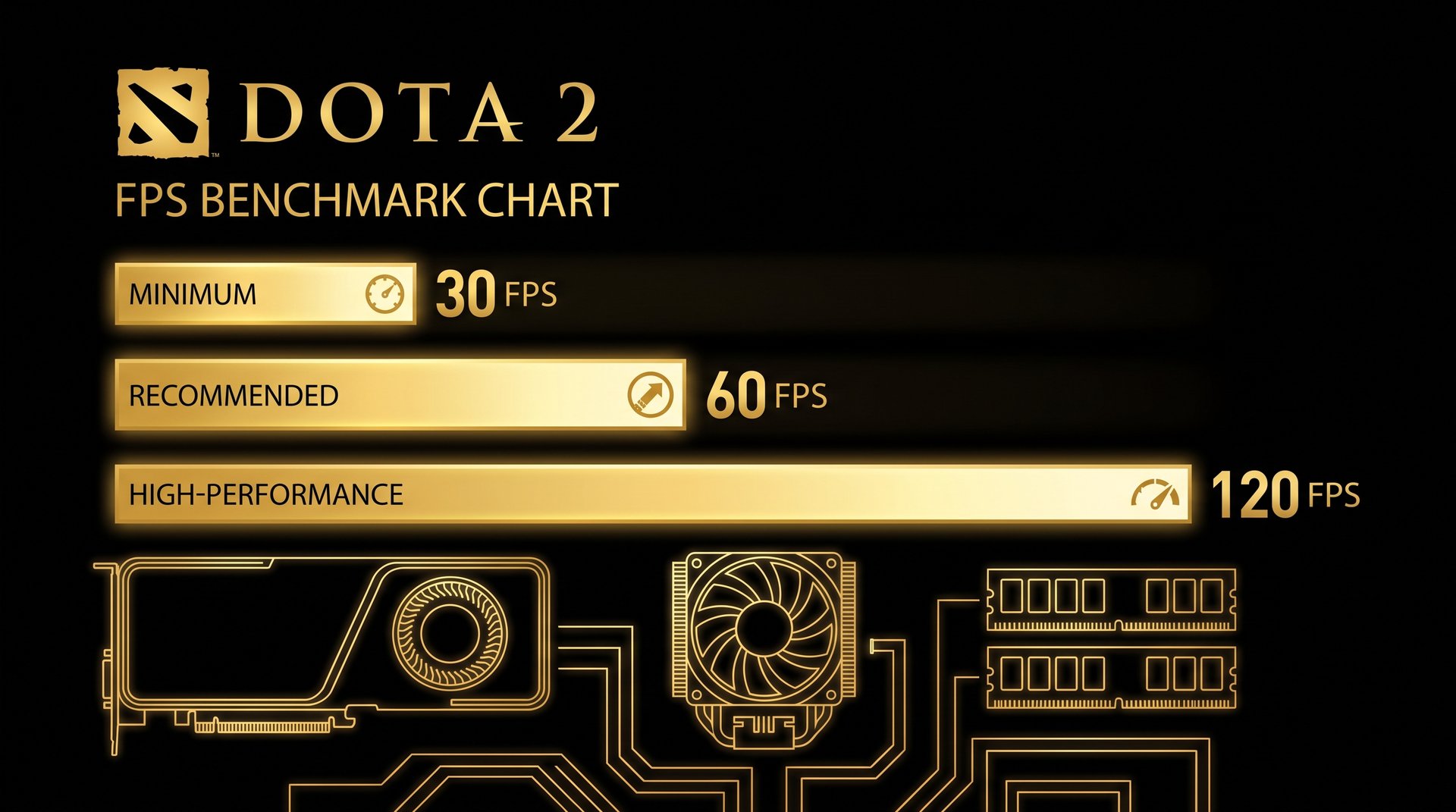
The table below covers all three tiers: the official Valve minimum (from the Steam store page), the community-recommended setup for a smooth pub experience, and the high-FPS configuration targeting 144+ fps at 1080p.
| Component | Minimum (Official) | Recommended (Community) | High-FPS (144+ fps) |
|---|---|---|---|
| OS | Windows 10 64-bit | Windows 10 / 11 64-bit | Windows 11 64-bit |
| CPU | Dual-core 2.8 GHz (Intel or AMD) | Intel Core i5-12400F / AMD Ryzen 5 5600 | Intel Core i7-12700K / AMD Ryzen 7 5800X |
| RAM | 4 GB | 8 GB DDR4 | 16 GB DDR4 |
| GPU | NVIDIA GeForce 8600/9600GT or AMD Radeon HD 2600/3600 | NVIDIA GTX 1060 6GB / AMD RX 580 | NVIDIA RTX 2070 / AMD RX 6700 XT |
| VRAM | 512 MB (minimum) | 6 GB | 8 GB |
| DirectX | Version 11 | Version 11 | Version 12 |
| Storage | 60 GB available space | 60 GB SSD | 60 GB NVMe SSD |
| Network | Broadband Internet | Broadband, 10 Mbps+ | Broadband, 25 Mbps+ |
| Sound | DirectX Compatible | Any modern sound output | Any modern sound output |
| Expected FPS | 20-40 fps (lowest settings) | 60-120 fps (medium-high, 1080p) | 144+ fps (high-ultra, 1080p) |
Dota 2 Download Size and Installation
Dota 2 requires 60 GB of available storage space, as listed on Steam. This is larger than you might expect for a game from 2013, and it has grown over the years as Valve added new heroes, cosmetics, map updates, and the Source 2 engine migration. That 60 GB figure is what you need free on your drive for the full install.
The initial download from Steam may be smaller — typically around 20-25 GB compressed — because Steam downloads assets in a compressed package and then extracts them. However, after installation, the full game directory uses approximately 55-60 GB depending on which optional content you have installed (custom games, downloaded replays, etc.).
SSD vs HDD for Dota 2
Dota 2 does not load open-world assets like an action RPG, so load times are not dramatically different on an HDD versus SSD. Most loading happens during the pre-game lobby phase, which lasts 60 seconds by default — plenty of time for even a slow HDD to finish. That said, an SSD eliminates occasional texture pop-in during the game and makes the Steam content validation faster when the game updates.
If you are on a tight storage budget, Dota 2 does not need an SSD. But if you are already running an SSD, install Dota 2 there. The difference in responsiveness is small but noticeable for the initial launch and map load.
How to Check Your Current Install Size
- Open Steam and right-click Dota 2 in your library
- Click “Properties” and then go to the “Local Files” tab
- You will see the total install size shown there
- To verify no files are missing or corrupted, click “Verify integrity of game files”
FPS Benchmarks by Hardware Tier (1080p, 2026)
The following FPS ranges are community-tested benchmarks gathered from hardware forums, Reddit, and GPU benchmark databases in 2025-2026. They represent typical performance in a full 10-player match at the settings noted — not a controlled lab measurement, and not official Valve data. Your results will vary based on CPU, RAM speed, and driver version.
| GPU | Settings Preset | Resolution | Expected FPS (Teamfight) | Tier |
|---|---|---|---|---|
| NVIDIA GTX 960 / AMD RX 480 | Medium | 1080p | 40-70 fps | Minimum-adjacent |
| NVIDIA GTX 1060 6GB / AMD RX 580 | High | 1080p | 80-120 fps | Recommended |
| NVIDIA GTX 1070 Ti / AMD RX 5700 | High-Ultra | 1080p | 100-144 fps | Near High-FPS |
| NVIDIA RTX 2070 / AMD RX 6700 XT | Ultra | 1080p | 144-200 fps | High-FPS |
| NVIDIA RTX 3080 / AMD RX 6800 XT | Ultra | 1440p | 144-180 fps | High-FPS 1440p |
Dota 2 is more CPU-bound than GPU-bound compared to most modern titles. The game’s Source 2 engine is single-threaded for much of its core logic, which means a fast single-core CPU clock speed matters more than a high core count. An older quad-core CPU with a high clock can outperform a newer CPU with many slower cores in Dota 2 specifically.
What the Official Minimum Specs Actually Mean
Valve’s minimum requirements are technically accurate — Dota 2 will launch and run on hardware matching those specs. But “runs” and “is playable” are different things at competitive MMR. Here is what each minimum component delivers in practice:
The Minimum CPU: Dual-Core 2.8 GHz
A dual-core processor at 2.8 GHz from around 2010-2014 (think Intel Core 2 Duo E7400, AMD Athlon II X2 240) will run Dota 2 — but only on the lowest graphical settings, and you will see FPS drops during late-game teamfights with heavy particle effects. The game’s logic is CPU-intensive during those moments. Expect 20-35 fps average in a real match, not in the training map.
The good news: almost any CPU sold in the last eight years is faster than this. If you bought a laptop or desktop PC in 2017 or later, the CPU is not your bottleneck.
The Minimum GPU: GeForce 8600 / Radeon HD 2600
These GPUs are from 2007 and represent DirectX 10-class hardware. On these cards you will need to run at the lowest rendering mode, possibly with “Render Quality” below 100%. Frame rates in actual matches will be in the 20-40 fps range. The game is playable in the sense that it will not crash, but you will notice stuttering during skill animations and teamfights.
Any GPU sold after 2012 — including integrated graphics on Intel HD 4000+ chipsets from that era — significantly exceeds this minimum.
The Minimum 4 GB RAM
4 GB of RAM is enough to run Dota 2, but on modern operating systems with a browser, Discord, and Steam all open, 4 GB leaves very little headroom. You may experience stuttering from page-file swapping. If you are on a machine with only 4 GB, closing every background application before launching Dota 2 is essential. An upgrade to 8 GB DDR4 is inexpensive and makes the single biggest practical improvement on minimum-spec hardware.
Community-Recommended Specs in Detail
Valve does not publish a formal “recommended” spec for Dota 2. The recommended specs in this guide reflect what the Dota 2 community consistently reports as the sweet spot for a smooth ranked experience in 2026: stable 60+ fps on high settings at 1080p with no stuttering, even during complex teamfights.
Recommended CPU: Intel Core i5-12400F or AMD Ryzen 5 5600
Both of these CPUs have strong single-core performance — the metric that matters most for Dota 2’s engine. The i5-12400F has six performance cores and runs at up to 4.4 GHz boost, which eliminates virtually all CPU-side frame drops in standard 10-player matches. The Ryzen 5 5600 reaches 4.4 GHz boost similarly and competes directly in Dota 2 frame rate tests. Either will serve you well for 3-5 years of Dota 2 play.
Older CPUs like the i5-8400 or Ryzen 5 2600 still work well at the recommended spec — they fall just below in late-game heavy scenarios but deliver the same experience for most of a match.
Recommended GPU: NVIDIA GTX 1060 6GB or AMD RX 580
These GPUs were the mainstream standard from 2016-2017 and remain widely available used. At 1080p on high settings they deliver a consistent 80-120 fps in Dota 2, with framerate rarely dropping below 60 even during big teamfights. The 6 GB VRAM on the GTX 1060 matters — the 3 GB variant runs into VRAM pressure on complex scenes with many hero models and particle effects loaded simultaneously.
Recommended RAM: 8 GB DDR4
8 GB at 3200 MHz eliminates the page-file swapping issue entirely. With Dota 2, Steam, Discord, and a browser all running, you will use around 5-6 GB, leaving comfortable headroom. Dual-channel configuration (two 4 GB sticks rather than one 8 GB stick) improves integrated-graphics performance significantly if you are on a platform that uses system RAM for the GPU.
High-FPS Build for 144+ fps
If you are playing on a 144 Hz or 165 Hz monitor and want to saturate it in Dota 2, the bottleneck is almost always the CPU before the GPU. Dota 2 becomes GPU-limited at 1080p on high-end rigs, but only after you have removed the CPU bottleneck first.
High-FPS CPU: Intel Core i7-12700K or AMD Ryzen 7 5800X
Both processors reach 4.9-5.0 GHz boost on their performance cores, which is the ceiling Dota 2 can effectively use per thread. At this level you will see 150-200 fps in standard matches and rarely drop below 144 fps during teamfights. Going to newer generations (i7-13700K, Ryzen 7 7700X) provides minimal additional Dota 2 FPS — the game does not scale linearly with single-core improvements above this threshold.
High-FPS GPU: NVIDIA RTX 2070 or AMD RX 6700 XT
At 1080p, these GPUs are more than capable for Dota 2 — in fact, the game becomes CPU-limited before you saturate either card. The RTX 2070 and RX 6700 XT serve double duty if you play other more demanding titles. For Dota 2 specifically, even an RTX 3060 is sufficient at 1080p for 144+ fps once the CPU is not a bottleneck.
If you are targeting 1440p at 144 fps, step up to an RTX 3080 or RX 6800 XT. Dota 2 scales well at higher resolutions from a visual clarity standpoint, and the game rewards the sharper image on a 27-inch display.
High-FPS Storage: NVMe SSD
While not strictly required for frame rates, an NVMe SSD reduces initial load time from around 30-40 seconds (SATA SSD) to under 15 seconds, and eliminates the texture streaming hitches that occasionally occur on a cold cache. It is the least impactful upgrade for in-game FPS but the most impactful for the overall feel of playing the game regularly.
Running Dota 2 on a Laptop
Dota 2 is one of the best games for laptop play because its low requirements translate directly to long battery life and cool operating temperatures on modest hardware. Almost any gaming laptop from 2017 onward will run Dota 2 at the recommended spec tier.
For laptops specifically, the GPU model matters less than its power delivery. A laptop RTX 3050 running at a 35W TDP will underperform a 65W version of the same card. Check the manufacturer’s spec for “TGP” (Total Graphics Power) when evaluating a laptop for Dota 2 at higher frame rates. Budget gaming laptops from major brands in 2024-2026 consistently run Dota 2 at 60+ fps on high settings.
Integrated graphics on modern CPUs — specifically Intel Iris Xe (12th-gen Core and later) and AMD Radeon 680M / 780M (Ryzen 6000/7000 series) — can run Dota 2 at 1080p medium settings with 30-60 fps. Not ideal for ranked, but functional for learning and casual games.
Planning to play Dota 2 on Mac or Linux, or on a Steam Deck? See our companion guide: Can You Play Dota 2 on Mac, Linux and Steam Deck?
How to Boost FPS on Low-End PCs
Before buying new hardware, exhaust the in-game and system-level settings that directly affect Dota 2 performance. On minimum-spec hardware, these settings can double your effective frame rate.
In-Game Graphics Settings
- Render Quality: Set to 75% or below — this is the single biggest FPS lever in Dota 2. It renders the scene at a lower internal resolution and upscales, sacrificing image clarity for performance.
- Texture Quality: Set to Medium or Low. High textures require more VRAM and cause hitches on cards with less than 4 GB.
- Shadow Quality: Disable or set to Low. Shadows are the most GPU-intensive setting in Dota 2.
- Ambient Occlusion: Disable. This is an advanced shading effect with noticeable performance cost and minimal visual benefit at low settings.
- Anti-Aliasing: Disable or set to 2x. At lower render quality settings it is largely redundant.
- Vertical Sync: Disable. V-sync introduces input lag and caps your FPS at your monitor refresh rate.
- High DPI: Disable on small monitors — rendering at native resolution on a 1080p monitor with weak hardware is unnecessary.
Windows-Level Optimizations
- Set Dota 2 to “High Performance” in the Windows power plan (Settings – System – Power)
- Close browser tabs, Discord video, and any streaming software before matches
- Update your GPU driver to the latest version — Valve regularly tests new driver releases and performance improvements appear in point releases
- Set Dota 2 process priority to “High” via the Windows Task Manager (right-click on dota2.exe while in-game)
Launch Options for Performance
Steam launch options can squeeze additional FPS out of low-end hardware. For the full list of performance launch flags including -dx11, -high, and memory allocation options, see our guide: Dota 2 Launch Options and FPS Settings 2026.
The most impactful single launch option for minimum-spec hardware is -dx11 on older systems that default to Vulkan, or -vulkan on AMD GPUs where the Vulkan renderer performs better than DirectX 11. Test both and use benchmark mode (launch with -benchmark) to compare your results before settling on one.
OS and DirectX Requirements
Dota 2 officially supports three platforms: Windows, macOS, and Linux (SteamOS). Here is what you need at the OS level for each.
Windows
The effective minimum is Windows 10 64-bit. The Steam client dropped Windows 7 and 8.1 support on January 1, 2024. Windows 11 is fully supported and adds no Dota 2-specific benefits — upgrade if you want it for other reasons, but do not upgrade specifically for Dota 2 performance. Dota 2 runs on both DirectX 11 and DirectX 12 / Vulkan on Windows; the renderer is selectable in the video settings or via launch options.
macOS
macOS requires 10.15 Catalina or newer and a Metal-capable GPU. Apple Silicon (M1, M2, M3, M4 series) runs Dota 2 via Rosetta 2 translation with good performance — typically 60-100 fps at 1080p equivalent on an M1 Pro or better. Valve ships a native Dota 2 arm64 binary, so no Rosetta overhead applies on M-series chips as of mid-2024. Intel Macs from 2017 onward run Dota 2 adequately with the AMD Radeon Pro 555 or better.
Linux
Linux support requires Ubuntu 12.04 or newer (or equivalent), with an AMD GCN+ GPU, NVIDIA Kepler+ GPU, or Intel HD 5000-series or newer. Dota 2’s native Linux build uses Vulkan as the primary renderer. Performance on Linux is generally within 5-10% of Windows for equivalent hardware, and AMD GPUs perform especially well under Linux due to the mature Mesa Vulkan driver stack.
Network and Connection Requirements
Dota 2 requires a broadband Internet connection. The game’s bandwidth usage during a match is low — typically 50-150 KB/s upload and download — but latency (ping) matters far more than raw throughput. Here is what to aim for by region:
| Ping Range | Region Examples | Gameplay Impact |
|---|---|---|
| Below 40 ms | EU West (Frankfurt), US East, SEA (Singapore) | No perceptible input delay, all mechanics work as intended |
| 40-80 ms | Most regional servers within continent | Minimal impact, time-sensitive mechanics (blink distance, turn rate) within normal tolerance |
| 80-150 ms | Cross-region or distant nodes | Noticeable on fast heroes and blink items, skill casts sometimes register one tick late |
| 150+ ms | Intercontinental, satellite, poor connections | Significant gameplay penalty — last-hitting and skill timing affected; matchmaking deprioritises high-ping lobbies |
If you are experiencing connection issues at match start — specifically the “Searching for Dota 2 Game Coordinator” error — that is usually a Steam server issue rather than a hardware or connection problem. See our troubleshooting guide: Dota 2 Game Coordinator Error: What It Means and How to Fix It.
Managing the 60 GB Download Size
60 GB is the full install, but there are a few ways to reduce or manage that footprint if you are on a tight storage budget or a slow connection.
Steam’s “Only Required Files” Option
In Steam’s download settings (Steam menu – Settings – Downloads) you can enable “Only download required files.” For Dota 2, this means Steam will not auto-download hero cosmetics you do not own. The hero models for cosmetics you have equipped are always downloaded, but the thousands of cosmetic sets available for heroes you have never bought will be deferred to on-demand streaming when you see them in a match. This can reduce the active install footprint noticeably in older Dota 2 setups.
Dota 2’s Background Download
Dota 2 downloads new hero assets and map updates in the background when you are in the main client, before patches fully deploy. If you play regularly, the game’s patch updates — which run between 200 MB and 2 GB for major patches — will download seamlessly. The 60 GB figure includes all current cosmetic bundles; individual patch downloads are smaller increments on top of the base install.
Asset Streaming
Dota 2 supports asset streaming for cosmetics — hero skin assets that are not in your inventory can stream on-demand rather than living permanently on your drive. Enabling this (it is on by default in newer client versions) keeps your local install closer to the base ~40-45 GB of required assets. The trade-off is a brief texture pop-in the first time you see a new cosmetic set during a match.
Dota 2, MMR, and Your Rank
Running Dota 2 well is the foundation, but winning games is what actually moves your rank. Hardware gives you stable frames and low input lag — but MMR gains come from decisions, hero selection, and game sense. If you want to understand how the ranked system works, our complete MMR boosting guide covers everything from calibration through Divine. You can also read about the best Dota 2 boosting services if you are looking to climb faster, and whether Dota 2 boosting is safe if you have questions about account security.
Struggling to Climb Despite Good Hardware?
A smooth 144 fps rig does not prevent avoidable deaths, bad drafts, or support players going carry. If your mechanics are there but your rank is stuck, a TeamSmurf coach can watch your replays and pinpoint exactly what is holding you back. No vague advice — just specific, actionable corrections from Immortal-bracket coaches who specialize in your role.