Dota 2 Match Decline and Draft-Leave Penalties: Is There a Dodge Rule?

You found a match. The green accept button flashes on screen. Then — you click X, or let the timer run out. What just happened to your account? Did you lose MMR? Is there a “dodge rule” in Dota 2 the same way League of Legends has one?
These questions come up constantly, especially for players who have heard horror stories about Low Priority queues and wrecked behavior scores. This guide breaks down exactly what happens when you decline a match at the acceptance screen, what a “draft-leave” actually is, and whether Valve has ever built a formal dodge system into the game.
Short answer: declining a match does not cost you MMR directly — but it costs you something almost as important. And if you leave during the hero selection phase, the rules change significantly. Here is everything you need to know.
How the Match Accept Screen Works
When Dota 2 matchmaking finds 10 players who meet the criteria for a ranked game, every player receives a pop-up notification with a 40-second countdown timer. To proceed, all 10 players must click the green checkmark (accept) within that window. If even one player declines — by clicking the X button — or simply lets the timer expire without clicking anything, the match is cancelled and the 10-player lobby is dissolved.
Players who accepted are returned to the matchmaking queue almost immediately. The next match attempt will be slightly slower because the pool just lost a player temporarily, but there is no penalty applied to the players who correctly accepted.
The player who declined, or who failed to accept, receives a queue cooldown. This is the direct consequence of declining — you are locked out of starting a new search for a set period of time. What you are NOT hit with is an MMR penalty.
| Event | Outcome for the Declining Player | Outcome for the Other 9 |
|---|---|---|
| Player clicks X (decline) | Queue cooldown begins, behavior score reduced | Returned to queue, no penalty |
| Timer expires (no click) | Same as decline — cooldown + behavior score hit | Returned to queue, no penalty |
| All 10 accept | Proceeds to hero selection | Proceeds to hero selection |
| Any player disconnects at accept | Treated as a failed accept — same penalties | Returned to queue, no penalty |
One common misconception is that “not clicking” is somehow a softer version of declining that avoids penalties. It is not. The system treats an expired timer exactly the same as a manual decline. Both hurt your behavior score and both trigger the queue cooldown.
Does Declining a Match Cost You MMR?
No. Declining at the match acceptance screen — before the game has technically started — does not deduct MMR from your account. The game never began, so there is no result to calculate. Your ranked MMR stays exactly where it was before you queued.
This is fundamentally different from abandoning a match mid-game, which does trigger an MMR deduction. The accept screen sits before the game ever loads, so Valve’s MMR system does not engage at that point.
So why do so many players believe declining costs MMR? A few reasons. First, they may be confusing the accept-screen decline with a draft-leave or in-game abandon. Second, the behavior score penalty (covered below) affects match quality so significantly that it can feel like MMR loss — you get put into worse lobbies, which can be harder to win, which can cause actual MMR loss through normal gameplay. But the decline itself is not the cause.
If you are already struggling with MMR loss and want to reverse it, the answer lies in improving your win rate in actual games — not avoiding declines specifically. Understanding the penalties correctly helps you focus your energy on what actually matters for your rank.
Behavior Score — the Real Cost of Declining
While declining does not touch your MMR, it does reduce your behavior score — and that matters significantly more than most players realize.
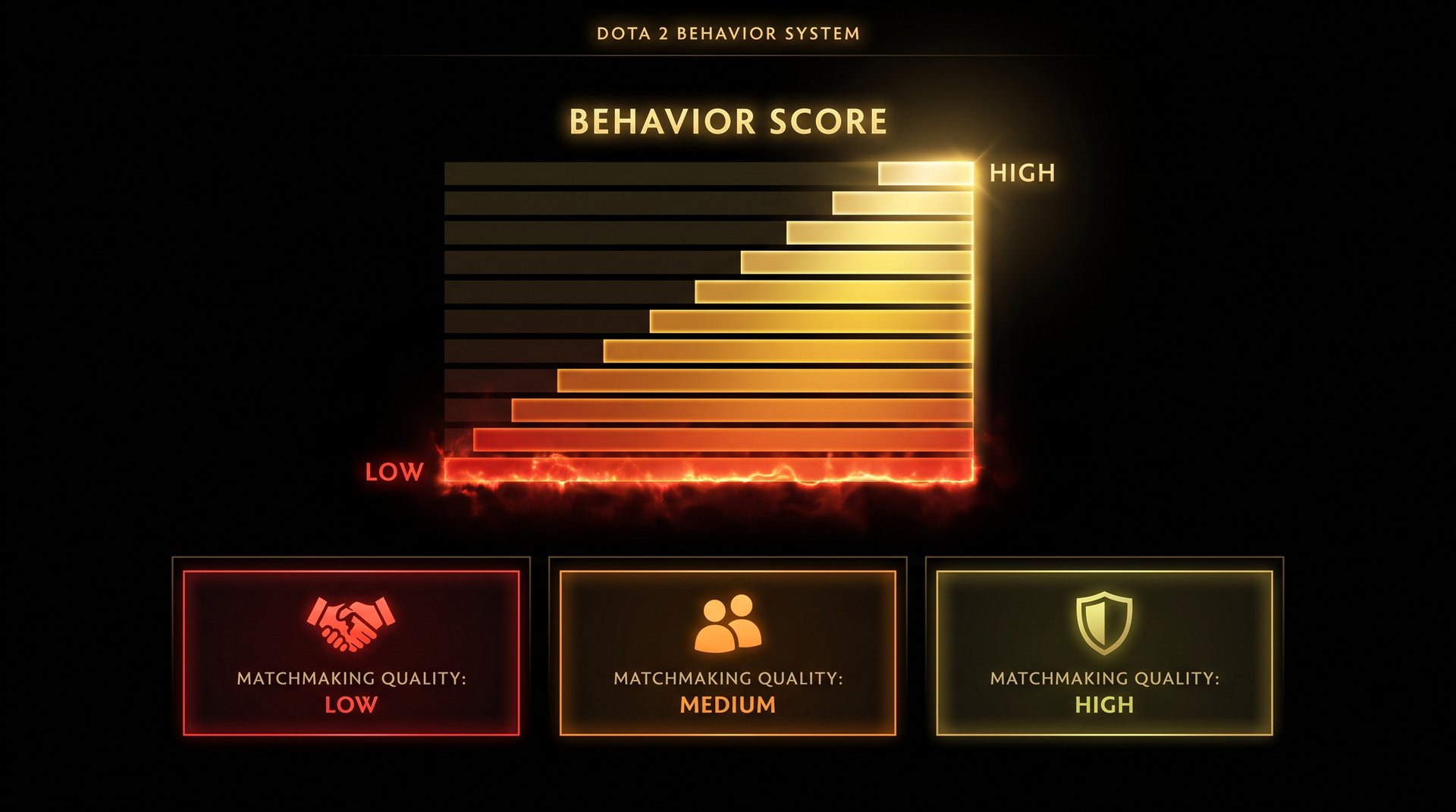
Behavior score is Valve’s hidden metric that tracks how positively or negatively you engage with the Dota 2 ecosystem. It affects which lobbies you appear in. Players with high behavior scores (roughly 9,000 to 12,000+) get placed in games with other well-behaved players — lower toxicity, fewer abandons, more competitive matches. Players with low behavior scores get increasingly chaotic lobbies filled with other low-score players.
Every match decline reduces your behavior score by a small amount. One decline here and there will not cascade into disaster, but consistent declining during a session will push your score downward. Combine that with reports, abandons, or communication abuse, and you can find yourself in a noticeably worse matchmaking environment within a single day of bad behavior.
| Behavior Score Range | Typical Lobby Quality | Queue Speed |
|---|---|---|
| 10,000 — 12,000+ | High — stable teammates, low abandon rate | Fastest |
| 7,000 — 9,999 | Good — occasional rough game | Normal |
| 4,000 — 6,999 | Mixed — noticeable volatility | Slightly slower |
| Below 4,000 | Poor — frequent abandons, toxic lobbies | Slow |
| Low Priority threshold | Low Priority queue only (no ranked) | Varies |
The exact behavior score thresholds Valve uses are not published, but the community data from Dotabuff and OpenDota provides consistent patterns. Once your score drops below roughly 3,000-4,000, you risk crossing into Low Priority territory, which removes your access to normal ranked matchmaking entirely until you win a set number of Low Priority games.
The takeaway: declining a match is never “free.” You avoid losing MMR directly, but you are burning a resource that directly affects how enjoyable your ranked games will be.
What Is a “Draft-Leave” in Dota 2?
The term “draft-leave” refers to disconnecting or leaving during the hero selection phase — the pick and ban screen that appears after all 10 players have accepted the match. This is a completely separate situation from declining at the accept screen, and it carries much more serious consequences.
In Dota 2’s ranked hero selection phase, players take turns picking their heroes within a 30-second window each. If you disconnect, close the client, or otherwise fail to be present during this phase, what happens depends on the game’s state:
- Early in picks (before any picks are made): The game system may cancel the lobby and treat it as a failed start. You receive an abandon mark and a behavior score hit.
- Mid-selection (some picks made): You may be assigned a random hero from your pre-selected hero pool, or a completely random hero if no pool exists. If the game starts while you are disconnected, it is treated as an in-game abandon.
- Connection restored before loading: If you reconnect before the game fully loads and launches, penalties may be reduced depending on how much time elapsed.
| Situation | MMR Impact | Behavior Score | Low Priority Risk |
|---|---|---|---|
| Decline at accept screen | None | Reduced (small hit) | Only if score is already borderline |
| Leave during hero selection (early) | Usually none (game cancelled) | Reduced (moderate hit) | Moderate if repeated |
| Leave during hero selection (late) | Possible loss if game starts | Reduced (large hit) | High if repeated |
| Abandon during game | Full loss (-30 standard) | Reduced significantly | High after 1-2 abandons |
The key difference is the game’s “started” state. The accept screen sits before anything has begun. Hero selection sits in a legal grey zone where the match technically exists but has not reached the first wave of creeps. The game’s servers record the lobby as active once picks begin, which is why penalties during this phase are stricter than a simple pre-accept decline.
Players who have had a game cancelled due to a draft-leave often report seeing a short lockout similar to a decline penalty plus an additional behavior score hit that stacks on top of any existing penalties from the session. If this happens repeatedly, the Low Priority threshold is reached faster than through accept-screen declines alone.
Is There a Dodge Rule in Dota 2?
No. Dota 2 does not have an official dodge rule or dodge system. In League of Legends, “dodging” means intentionally leaving the champion select lobby before the game starts, accepting a fixed MMR penalty (usually -3 LP for a first dodge, more for subsequent dodges within a cooldown window) in exchange for avoiding a game you do not want to play. It is a built-in safety valve that Riot designed deliberately.
Valve has never implemented an equivalent system in Dota 2. There is no button, no menu option, and no official mechanic that lets you exit a hero selection lobby with a predictable, capped penalty the way LoL’s dodge system works.
The closest mechanic to a “dodge” in Dota 2 is simply declining at the accept screen — clicking the X when the match notification appears. This cancels the game before it begins, but unlike LoL’s dodge system, it does not come with a transparent, documented penalty structure. Instead, it triggers the queue cooldown and behavior score reduction described above, which accumulate in ways that are not clearly communicated to the player in the moment.
Why Valve Has Not Added a Dodge System
Several reasons have been discussed by the Dota 2 community over the years:
- Limited information at pick time: Since you cannot see enemy heroes during pick phase (in most modes), there is less strategic reason to dodge. You are not reacting to a hard counter the way you might in LoL.
- Queue time considerations: At lower population hours, Dota 2 matches already take longer to find than LoL games. A formal dodge system that adds cooldowns would make this worse.
- The behavior score system: Valve’s answer to “bad” games is the behavior score ecosystem, which theoretically filters toxic players away from well-behaved ones. A dodge system implies the matchmaking has failed — something Valve is reluctant to acknowledge officially.
- Captains Mode and team league play: These formats have their own draft integrity rules at the competitive level that make a casual-ranked dodge equivalent unnecessary.
The bottom line: if you are thinking about “dodging” in Dota 2, you are actually declining — and you should be aware that the penalties, while not including MMR loss, are real and accumulate over sessions.
How Decline Penalties Escalate With Repetition
A single decline in a session is relatively minor. The first queue cooldown is typically around 3 to 5 minutes — an annoyance, but nothing that disrupts your play session significantly. However, repeated declines within the same session trigger an escalation system where each subsequent decline in a rolling window produces a longer cooldown.
Valve does not publish exact cooldown escalation numbers, but community testing and player reports have established a rough pattern:
| Decline Count (in one session) | Approximate Queue Cooldown | Behavior Score Impact |
|---|---|---|
| 1st decline | 3 — 5 minutes | Minor reduction |
| 2nd decline | ~10 — 15 minutes | Moderate reduction |
| 3rd decline | ~30 minutes | Significant reduction |
| 4th+ declines | 1 — several hours | Heavy reduction, LP risk |
Beyond the cooldown timer, there is also the matter of behavior score accumulation. Even if each individual decline removes only a small amount of behavior score, four or five declines stacked in an afternoon can push a borderline-score account into Low Priority territory. Players who are already at 4,000-5,000 behavior score are particularly vulnerable to a cluster of declines accelerating their drop below the threshold.
One trick that some players attempt is letting the timer expire rather than actively clicking decline, under the belief that “inaction” is treated differently. This is incorrect. The system does not distinguish between an active click and an expired timer. Both produce the same queue cooldown and the same behavior score hit. The only player behavior that avoids any penalty is simply accepting the match.
Account-Level Pattern Flags
There is evidence — though not officially documented by Valve — that the matchmaking system tracks decline patterns over longer periods than a single session. Accounts that systematically decline at certain times of day, in certain MMR brackets, or at high rates across weeks may receive escalated cooldowns that persist longer than the standard session-based escalation. If you are a professional booster or coaching client at a legitimate Dota 2 boosting service, maintaining clean account behavior between sessions is one of the most frequently overlooked aspects of safe, sustainable play.
The Low Priority Queue Connection
Low Priority queue is Valve’s most significant behavioral consequence for players who accumulate enough negative actions — abandons, declines, griefing reports, and communication bans. Once your behavior score drops to the threshold (community estimates place this around 3,000 or below), you lose access to normal ranked matchmaking and can only play in the Low Priority pool.
Low Priority games are immediately recognizable: teammates have higher rates of toxicity, abandons happen more frequently, and communication is often poor. The pool has no ranked MMR on the line, but the experience is designed to be less pleasant than normal play — a deliberate deterrent.
To exit Low Priority, you must win a set number of games — typically 3 to 5 depending on how many offenses triggered the status. These must be wins, not just completions. If you or a teammate abandons during a Low Priority game, it does not count toward your exit requirement. You can read a full breakdown of how Low Priority works and how to get out in our dedicated guide.
The path from “I just declined a match” to “I am now in Low Priority” is not a single step — it requires a pattern of behavior that stacks enough hits to cross the threshold. But if you are already close to that threshold due to a rough week of games and reports, even a cluster of declines can push you over.
A common scenario we see at TeamSmurf: A client contacts us after getting stuck in Low Priority following a session where they declined 3-4 matches in frustration, on top of two earlier abandons from a power cut. The declines alone would not have done it. Combined with the abandons, it was enough to cross the threshold. The solution — complete the LP exit requirement, then focus on rebuilding MMR in clean games — is more effective than trying to rush back through ranked immediately afterward.
How to Avoid Unnecessary Penalties
The single most effective way to avoid decline and draft-leave penalties is to only queue when you are actually ready to play a full game. This sounds obvious, but several common situations lead players to queue when they should not:
Check Your Connection Before Queuing
A flaky internet connection is responsible for more behavior score damage than intentional behavior in many accounts. If your connection drops during hero selection or in the first few minutes of a game, the system does not distinguish between a disconnect and an intentional leave. Run a quick speed test or ping check before starting a ranked queue session, especially during peak hours when ISP congestion is more likely.
Do Not Queue If You Expect Interruptions
A Dota 2 ranked game typically runs 35 to 60 minutes, with hero selection adding another 3-5 minutes. If you know someone is coming over in 20 minutes, or dinner is being called in 15 minutes, queuing ranked is a bad trade. A single abandon or force-close costs more behavior score than three or four declined matches.
Use the Pause System Mid-Game
If something unexpected comes up after a game has started, the in-game pause system (default: F9) is your best tool. You have a limited number of pauses per team, and the other team can unpause after a timeout, but for brief interruptions like a phone call, pausing costs nothing and prevents an abandon. This is far preferable to leaving, which carries penalties that affect account health in ways that take time to repair.
When Declining Is the Right Call
There are legitimate situations where declining is the correct choice for both you and your teammates:
- Your internet just dropped and you reconnected at the accept screen — declining now is better than abandoning in the first 5 minutes when your connection may drop again
- You are on the edge of your available time and cannot commit to a full match
- You are tilted from a previous game and know you will play poorly or react badly — a 5-minute cooldown is worth more than one game where you are a liability to four teammates
The difference between these situations and habitual declining is intent and frequency. One decline for a good reason is a healthy use of the mechanic. Four declines in a row because matchmaking keeps putting you in games with heroes you do not like is the pattern that causes real account damage.
Frequently Asked Questions
Stuck in Low Priority or Losing MMR?
Getting out of a rough patch is easier when you are not fighting the algorithm alone. TeamSmurf’s Dota 2 boosters play on your account at your target MMR bracket, winning games cleanly and restoring your rank. We also offer coaching sessions if you want to understand WHY you are losing — so the gains stick.
Boost My MMR Book a Coaching Session