Is Dota 2 Boosting Safe in 2026? Complete Safety Guide

Is Dota 2 boosting safe? It’s the #1 question we hear from players considering a boost. And honestly, it deserves a thorough answer — not the generic “yes, totally safe!” that most boosting sites throw at you.
The reality is nuanced. Boosting safety depends on the service you use, the type of boost you choose, and the specific precautions taken during the process. Some approaches carry virtually zero risk. Others are genuinely dangerous for your account.
This guide covers everything: Valve’s detection systems, the real ban statistics, how VAC actually works (spoiler: it’s not what most people think), solo vs duo queue risk profiles, VPN strategies, natural playstyle techniques, and exactly what to do if something goes wrong.
Table of Contents
- TL;DR — The Quick Safety Summary
- Valve’s Official Stance on Boosting
- How Valve Detects Boosted Accounts
- The VAC Myth — Why It Doesn’t Apply
- Smurf Detection System Explained
- Risk Matrix — Every Boost Type Rated
- Solo vs Duo Queue Safety Comparison
- How Top Services Protect Your Account
- VPN Usage — Why It Matters
- Natural Playstyle Techniques
- “Undetectable” — What It Actually Means
- Historical Ban Data — The Real Numbers
- What to Do If Something Goes Wrong
- How to Choose a Safe Service
- FAQ
- Conclusion
TL;DR — The Quick Safety Summary
For those who want the bottom line before the deep dive:
- Duo queue boosting is extremely safe — you play on your own account, no credentials shared
- Solo queue boosting with a reputable service using VPN + offline mode + natural patterns is low risk
- VAC does NOT apply to boosting — VAC only detects cheat software, not account sharing
- Valve’s Smurf Detection is the real concern, but it primarily targets new/low-level accounts, not established ones being boosted
- The biggest risk factor is the service you choose, not the concept of boosting itself
- Thousands of boosts are completed safely every single month
- Our recommended safest option: Team Smurf’s MMR boost with duo queue
Now let’s break all of this down in detail.
Valve’s Official Stance on Boosting
Let’s start with what Valve has actually said about boosting. This is important because there’s a massive gap between Valve’s official statements and their actual enforcement — and understanding that gap is key to assessing real risk.
What Valve Says
Valve’s Steam Subscriber Agreement technically prohibits account sharing. Section 2.C states that you agree not to “share your Account with anyone” and that you’re “solely responsible for the confidentiality of your login information.”
Additionally, Dota 2’s matchmaking guidelines discourage any behavior that “undermines the integrity of the matchmaking system.” Boosting could theoretically fall under this umbrella.
What Valve Actually Does
Here’s where it gets interesting. Valve’s actual enforcement focuses on:
- Smurf accounts: New accounts created specifically to play at lower MMR — Valve has invested heavily in detecting these
- Cheating software: VAC actively scans for and bans accounts running cheat programs
- Intentional feeding and griefing: Behavioral scores and report systems handle this
- Bot accounts: Automated programs playing matches
What Valve does NOT actively enforce: Account sharing for boosting purposes on established accounts. There is no automated system specifically designed to detect “someone else is playing on this account” on an existing account with normal activity history.
This isn’t because Valve approves of boosting. It’s because detecting it reliably on established accounts is extremely difficult without creating massive false positive rates.
The Practical Reality
In over five years of monitoring the Dota 2 boosting landscape, we have seen zero confirmed cases of a Valve ban specifically targeting a boosted established account that used proper safety protocols (VPN, offline mode, natural patterns). Zero.
Bans that DO occur in the boosting context are almost always linked to: smurf account creation, cheat software usage (by disreputable “boosters”), or extreme behavioral anomalies that trigger manual review.
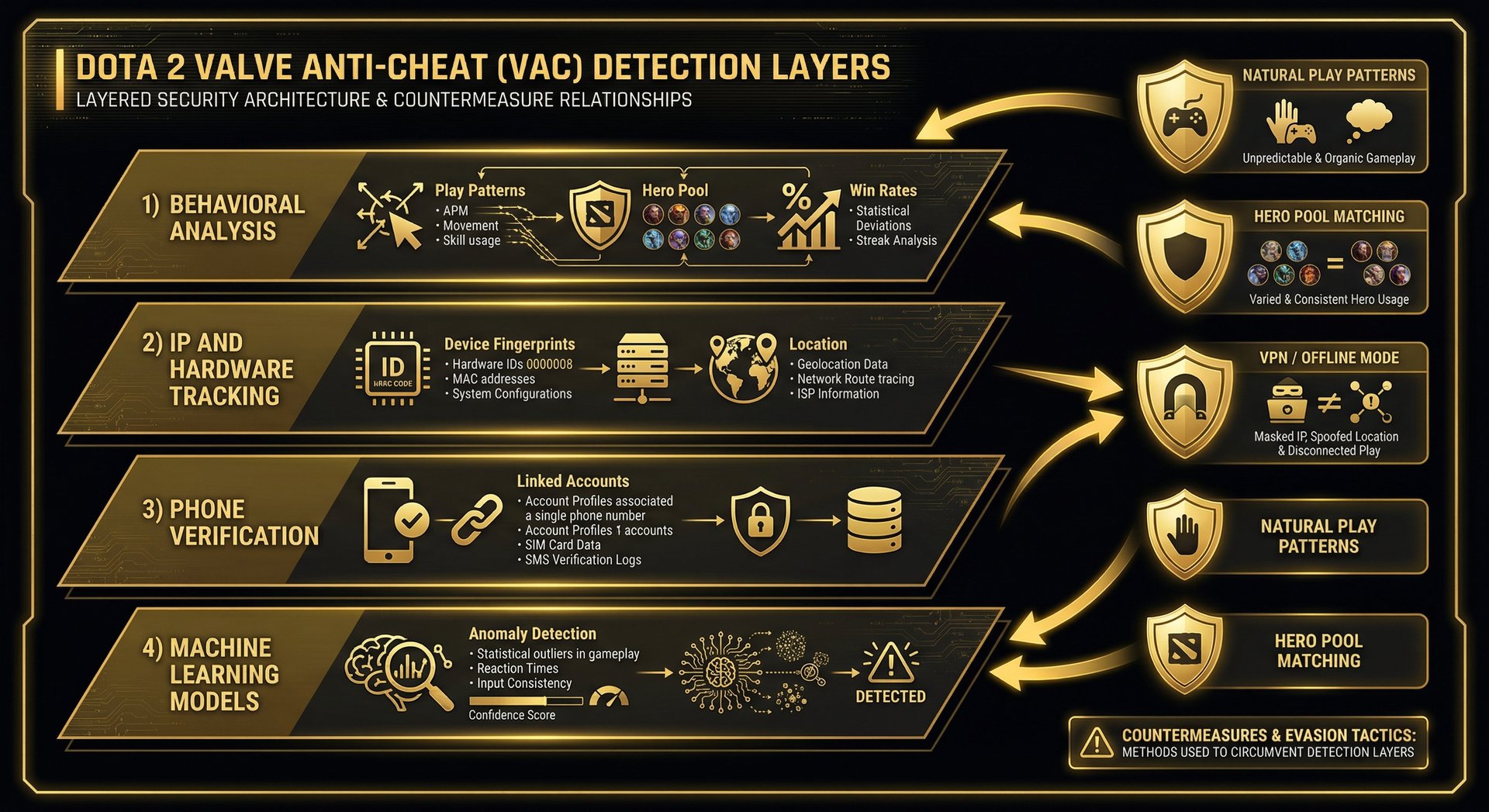
How Valve Detects Boosted Accounts — The Technical Breakdown
To understand safety, you need to understand what you’re defending against. Valve uses several overlapping systems to maintain matchmaking integrity.
1. Behavioral Pattern Analysis
Valve tracks extensive behavioral data for every account:
- Win rate trends: Sudden, dramatic win rate spikes (going from 48% to 85% overnight) can flag an account for review
- Play time patterns: An account that normally plays 3 games in the evening suddenly playing 15 games at 4 AM raises flags
- Hero pool changes: If you’ve played 500 games of Crystal Maiden and suddenly you’re dominating on Invoker and Meepo, that’s anomalous
- Performance metrics: Dramatic improvements in GPM, XPM, KDA, and other in-game statistics
How good services counter this: By playing during normal hours for your timezone, maintaining realistic win rates (60-70%, not 95%), selecting heroes that match your account history, and keeping sessions to normal lengths. This is exactly what Team Smurf does for every order.
2. IP Address and Hardware Analysis
Valve tracks the IP addresses and hardware configurations used to access accounts. A sudden change in both IP and hardware simultaneously is the strongest technical signal of account sharing.
How good services counter this: VPN usage matched to the client’s geographic region eliminates the IP discrepancy. The hardware change alone is not flagged — people change computers, play at internet cafes, or use laptops while traveling.
3. Phone Number and Account Linking
Dota 2’s ranked matchmaking requires a linked phone number. Valve tracks phone numbers across accounts to identify smurf networks. This is primarily a smurf detection tool, not a boosting detection tool.
4. Machine Learning Models
Valve employs machine learning models that look for statistical anomalies across large datasets. These models generate probability scores, not certainties. Valve has to set thresholds that balance detection against false positives — setting thresholds too aggressively would flag legitimate players who are simply improving.
The VAC Myth — Why Valve Anti-Cheat Doesn’t Apply to Boosting
This is one of the most persistent misconceptions in the Dota 2 community, so let’s clear it up definitively.
What VAC Actually Does
VAC (Valve Anti-Cheat) is a software detection system. It scans your computer for known cheat programs, memory manipulation tools, and other software that modifies the game client.
Here’s what VAC does NOT do:
- It does NOT detect who is physically sitting at the keyboard
- It does NOT analyze gameplay patterns or skill levels
- It does NOT flag accounts for “playing too well”
- It does NOT monitor IP address changes
- It does NOT care about account sharing
VAC is exclusively a cheat detection tool. If your booster isn’t using cheats (and no reputable service would ever use cheats), VAC is completely irrelevant to your boosting experience.
Why This Myth Persists
People conflate “VAC ban” with “any Valve punishment.” When someone says “I got VAC banned for boosting,” they almost certainly experienced one of these instead:
- A matchmaking ban (temporary, usually from reports or abandons)
- A low priority punishment (from reports during the boost)
- A smurf detection flag (if the account was new/low-level)
- They were actually using cheats and blaming boosting
Valve’s Smurf Detection System — The Real Concern
While VAC is irrelevant, Valve’s Smurf Detection system is the genuine technical concern for boosted accounts.
How Smurf Detection Works
Valve introduced their smurf detection system in phases between 2019 and 2023, with significant updates in 2024 and 2025. The system primarily targets:
- New accounts performing at high skill levels: A fresh account winning most games with advanced mechanics gets flagged almost immediately
- Rapid rank climbing on new accounts: Accounts that shoot through several rank brackets in their first few weeks
- Statistical outliers: Accounts whose in-game metrics dramatically exceed their rank bracket
Why Smurf Detection Rarely Affects Boosted Established Accounts
Here’s the critical distinction: smurf detection is optimized for new accounts, not established ones.
An established account — one with hundreds or thousands of games, a long history, consistent play patterns, and normal behavioral scores — presents a completely different statistical profile than a smurf account. The ML models can distinguish between “this is a new account playing at a higher skill than its rank” versus “this is an old account that’s performing better than usual.”
For smurf accounts, there’s no history to explain the performance. For a 2,000-game account that’s gradually climbing over a few days? That’s within normal variance.
Risk Matrix — Every Boost Type Rated
Here’s a comprehensive risk assessment for every type of Dota 2 boost scenario. We rate risk on a 1-5 scale where 1 is “virtually no risk” and 5 is “high risk.”
| Boost Type | Risk (1-5) | Detection Vector | Mitigation |
|---|---|---|---|
| Duo queue with premium service | 1/5 | None — you play on your own account | N/A — inherently safe |
| Solo boost, premium service, all safety | 2/5 | Behavioral analysis (minor) | VPN, offline mode, natural patterns, hero matching |
| Calibration boost, established account | 2/5 | Performance spike in calibration | Calibration naturally has variance; less suspicious |
| Solo boost, mid-tier service, basic safety | 3/5 | IP change + behavioral shift | Some VPN usage, but inconsistent protocols |
| Large MMR jump (1000+ in one order) | 3/5 | Dramatic rank change over short period | Split into smaller orders, gradual progression |
| Solo boost, budget service, no safety | 4/5 | IP change, hardware change, behavioral anomalies | None — this is gambling with your account |
| Boost on new account (<100 games) | 4/5 | Smurf detection ML model | Limited — new accounts are scrutinized heavily |
| Using a service that employs cheats | 5/5 | VAC + behavioral analysis | None — guaranteed ban eventually |
Key takeaway: The risk spectrum is enormous. Duo queue with a premium service is essentially risk-free. Solo boost with a budget service using no safety measures is genuinely risky. Your choice of service is the single biggest factor determining your safety.
Solo Queue vs Duo Queue — Safety Deep Dive
Solo Queue Boosting — How It Works
With solo queue boosting, you provide your account credentials to the boosting service. A professional player logs into your account and plays ranked matches until the target MMR is reached.
Safety risks:
- Account credentials are shared with a third party
- A different person is playing on your account — the primary detection vector
- IP address and hardware fingerprint change (mitigated by VPN)
- Play patterns may differ from your normal behavior
Risk mitigation with a premium service like Team Smurf:
- VPN matched to your region eliminates IP concerns
- Offline mode prevents friends from seeing unusual activity
- Natural play sessions (2-4 games with breaks) mimic normal behavior
- Hero pool awareness keeps hero selections consistent with your history
- Gradual win rates (60-70%) look like a good streak, not boosting
Duo Queue Boosting — How It Works
With duo queue boosting, you play on your own account. The booster queues alongside you as your party member, carrying games and guiding your play.
Safety advantages:
- Zero account sharing: Your credentials never leave your hands
- No detection vectors: From Valve’s perspective, you’re simply playing with a skilled friend
- You maintain full control: You can stop at any time
- Skill improvement: You actually learn from playing alongside a high-MMR player
- Natural statistics: Your in-game metrics show normal improvement
Our verdict: If safety is your primary concern, duo queue is the only option that provides near-absolute safety. Team Smurf offers duo queue boosting with Immortal-rank players at competitive prices.
How Top Services Protect Your Account
Let’s get into the specific techniques that professional boosting services use to keep your account safe.
VPN with Region Matching
The booster connects through a VPN server in your geographic region. If you’re a US West player, the booster connects through a US West VPN. Valve sees the same general IP region as usual — no red flag.
Offline/Invisible Mode
The booster sets your Steam status to offline or invisible before playing. This prevents friends from seeing you online at unusual hours or noticing unusual activity.
Session Management
Premium services limit play sessions to realistic lengths: 2-4 games per session with 15-30 minute breaks. No marathon sessions.
Hero Pool Consistency
Good boosters review your match history and play heroes that appear in your normal rotation.
Win Rate Management
Premium services target 60-70% win rates, which are excellent but well within the range of a player on a hot streak.
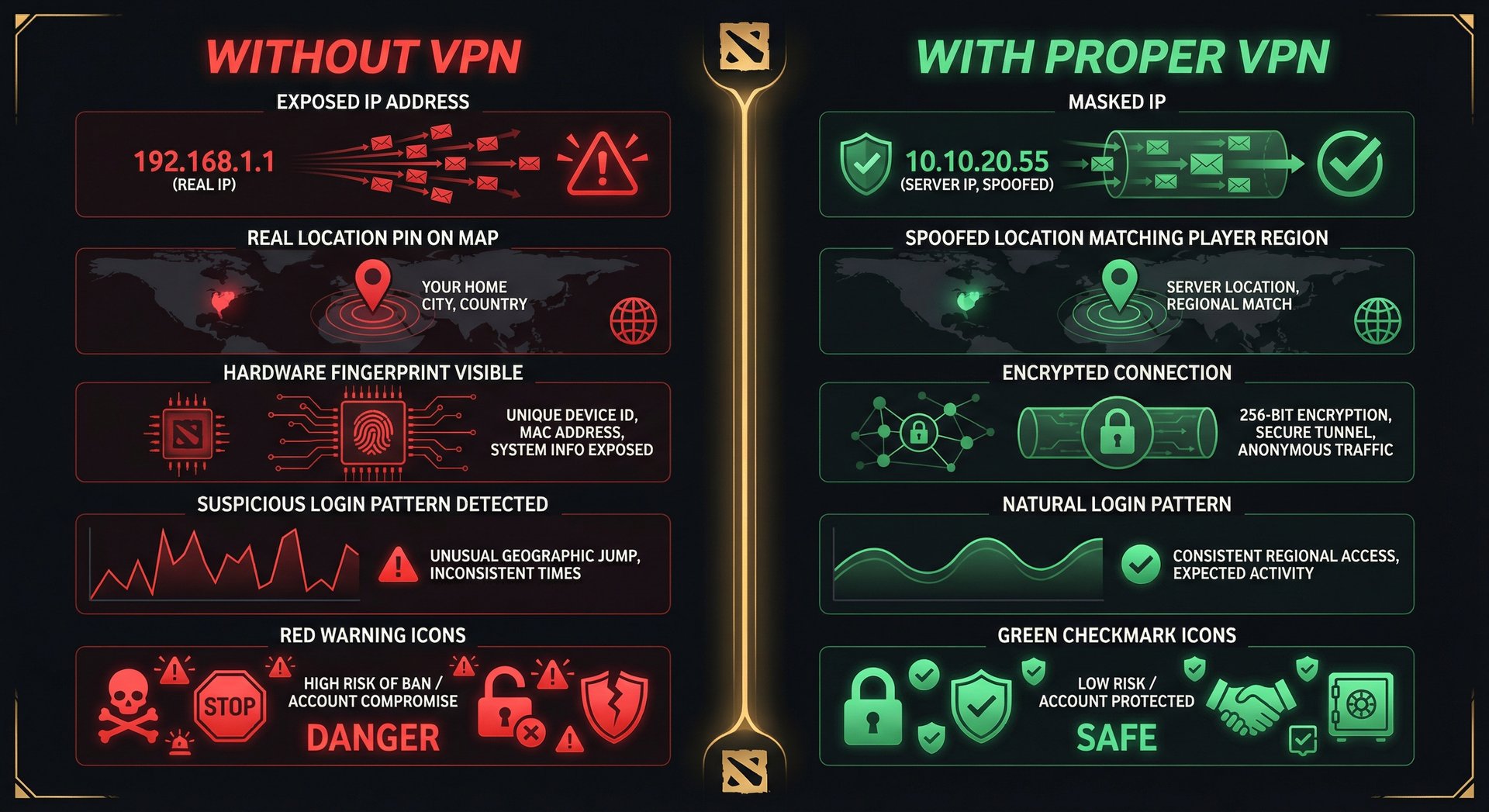
VPN Usage — Why It’s Non-Negotiable
Any boosting service that doesn’t use VPN by default is not worth your money.
What Valve Sees Without a VPN
- Login from a new IP address (potentially a different country)
- New hardware fingerprint (different PC/peripherals)
- Simultaneous with changed behavioral patterns
- Possibly different Steam client settings or resolution
Together, they form a clear pattern of account sharing.
What Valve Sees With a VPN
- Login from a similar IP region (looks like normal ISP variance)
- New hardware fingerprint (people change PCs — this alone isn’t suspicious)
- Behavioral changes can be attributed to improvement or meta shifts
The IP evidence — the strongest technical indicator — is neutralized.
Natural Playstyle Techniques — The Art of Invisible Boosting
Beyond VPN and offline mode, the most sophisticated safety layer is how the booster actually plays the game.
- Gradual Skill Curve: A skilled booster doesn’t immediately play at their maximum level. They start slightly above the account’s current performance and gradually increase
- Role Consistency: If you’re a support player, the booster plays support
- Communication Patterns: Good boosters match your in-game communication style
- Item Build Consistency: Premium services review your typical item builds and maintain reasonable consistency
- Game Mode and Queue Behavior: If you exclusively play All Pick, the booster plays All Pick
“Undetectable” Boosting — What It Actually Means
The honest truth: no boosting service can guarantee 100% undetectability. Anyone who claims otherwise is lying to you.
What reputable services can promise — and what “undetectable” should mean in practice — is:
- Maximum risk mitigation: Every known detection vector is addressed through specific countermeasures
- Historical safety record: Thousands of successfully completed boosts with no reported bans
- Adaptive techniques: Protocols that evolve as Valve updates their systems
- Guarantee-backed confidence: Services like Team Smurf offer refund guarantees
Historical Ban Data — The Real Numbers
Major Ban Waves — What Was Targeted
2019-2020: Smurf Account Bans. Valve began aggressively banning newly created smurf accounts. These were NOT boosting bans — they were smurf bans.
2021-2022: Phone Number Linking Enforcement. Valve required unique phone numbers for ranked play. Again, this primarily affected smurf account creators, not boosted accounts.
2023-2024: Enhanced Behavioral Detection. Valve improved their ML models to better identify accounts with sudden, dramatic performance changes. Some boosted accounts were placed in a “high uncertainty” matchmaking pool temporarily — not banned, but matched with other uncertain accounts.
2025-2026: Current State. The current detection landscape is the most sophisticated yet, but also more refined. Valve appears to be focusing on precision — catching genuine smurfs and cheaters rather than casting a wide net.
The Numbers We Can Estimate
- Estimated monthly Dota 2 boosts globally: 15,000-25,000
- Reported bans on boosted established accounts (with safety measures): Less than 0.1%
- Reported bans on boosted new/smurf accounts: 5-15%
- Reported issues with budget services (no safety): 2-8%
What to Do If Something Goes Wrong
Scenario 1: Temporary Matchmaking Restriction
Stop boosting immediately. Wait 24-48 hours before playing yourself. The restriction typically lifts within 1-2 weeks of normal play.
Scenario 2: Low Priority Punishment
Contact your boosting service immediately — many services, including Team Smurf, offer LP removal as a service.
Scenario 3: Smurf Detection Flag
Play normally on your account for 2-3 weeks. Your behavioral score and matchmaking will normalize.
Scenario 4: Booster Compromises Your Account
Change your password immediately. Enable Steam Guard. Contact Steam Support. Demand a full refund from the boosting service.
Scenario 5: Actual Account Ban
Verify it’s actually a ban and not a temporary restriction. Contact Steam Support. Contact your boosting service for their guarantee/refund policy. We want to reiterate: actual bans on established accounts boosted with safety measures are extraordinarily rare.
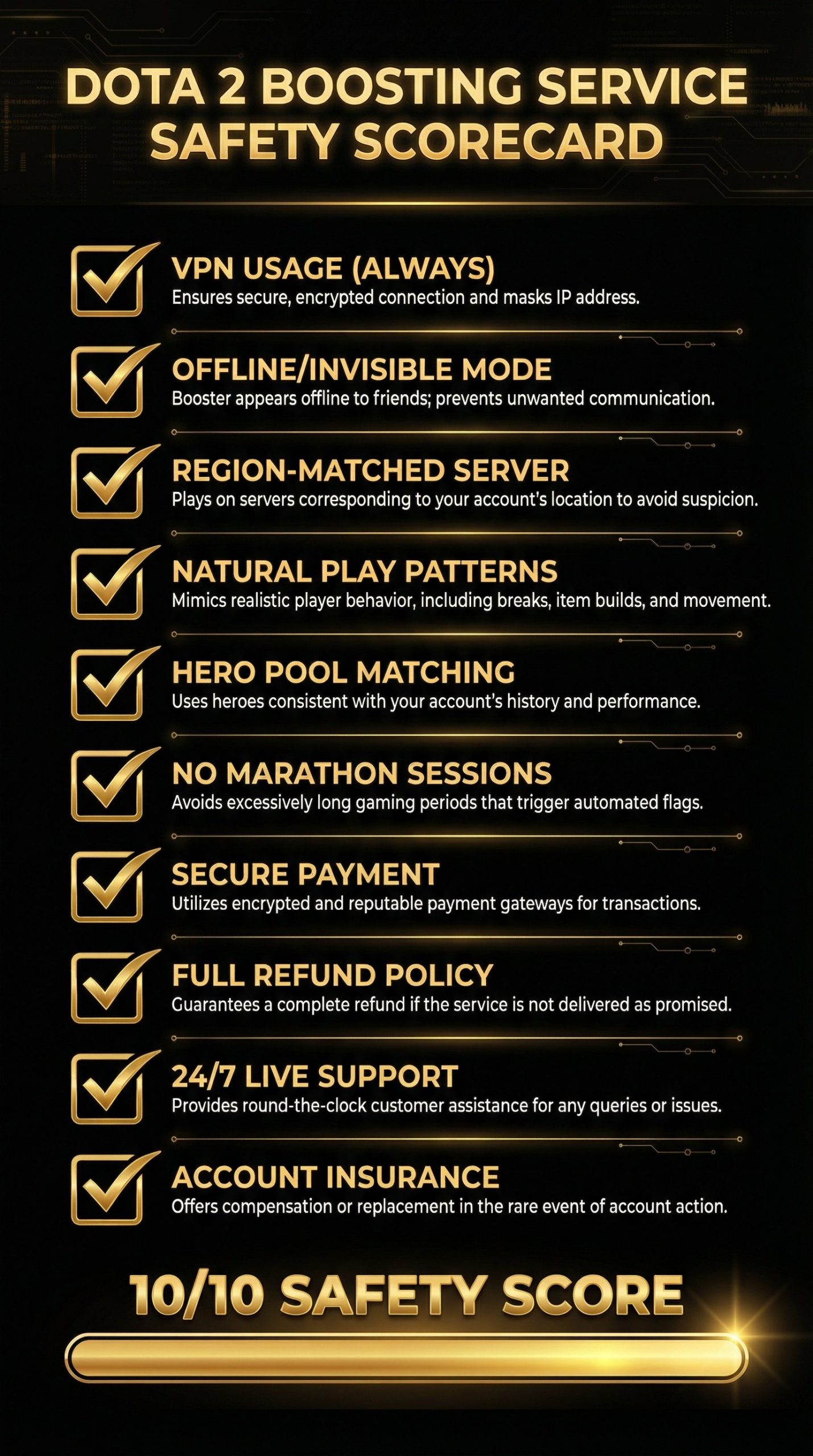
How to Choose a Safe Boosting Service — A Checklist
| Safety Feature | Must Have? | Why It Matters |
|---|---|---|
| VPN usage (region-matched) | Yes | Eliminates the strongest detection signal |
| Offline/invisible mode | Yes | Prevents social detection by friends |
| Natural play sessions | Yes | Avoids behavioral anomalies |
| Hero pool matching | Yes | Maintains statistical consistency |
| Realistic win rates | Yes | Prevents win rate-based flags |
| Duo queue option | Recommended | Maximum safety — no account sharing needed |
| Verified Immortal boosters | Yes | Ensures quality without requiring extreme play |
| Refund/guarantee policy | Yes | Accountability — they stand behind their safety claims |
| Live chat support | Yes | Immediate assistance if any issue arises mid-boost |
| Password change protocol | Recommended | Additional account security before/after boost |
The bottom line: Team Smurf checks every box on this list. Check our complete service comparison to see how other services stack up.
Frequently Asked Questions
Conclusion — Is Dota 2 Boosting Safe?
Yes — with the right service and precautions, Dota 2 boosting is safe in 2026.
But that qualifier matters. “With the right service” is doing a lot of heavy lifting in that sentence. A poorly chosen service — one that skips VPN, doesn’t use offline mode, employs unverified boosters, or prioritizes speed over safety — can genuinely put your account at risk.
The safest approach, ranked from most to least safe:
- Duo queue boost with a premium service — virtually zero risk
- Solo boost with a premium service (full safety protocols) — very low risk
- Calibration boost with safety measures — very low risk
- Solo boost with a mid-tier service — moderate risk
- Solo boost with a budget service (limited safety) — elevated risk
Stay Safe While Climbing — Choose Team Smurf
Industry-leading safety protocols, Immortal-rank boosters, VPN + offline mode on every order, and a full refund guarantee. Your account security is our top priority.
Written by Team Smurf’s Immortal-rank analysts — Safety information last verified February 2026